
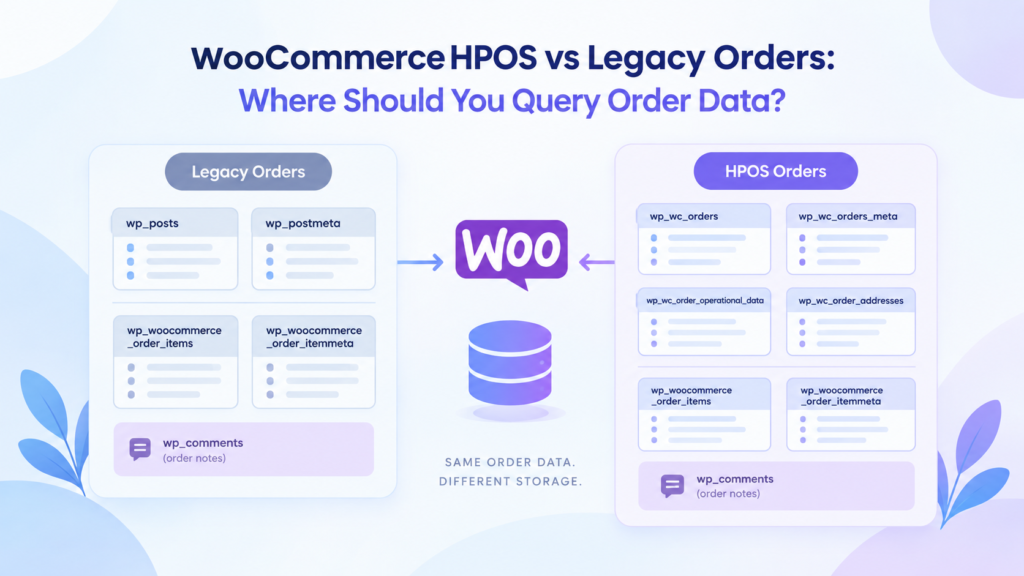
WooCommerce stores order data differently depending on whether the store uses High Performance Order Storage (HPOS) or the Legacy Order Storage system. This difference matters when you are writing custom queries or developing a plugin that is expected to work across multiple setups.
A query that works perfectly on a legacy store may not be the right approach on an HPOS store. In some cases, it may not work at all. In this post, we’ll look at where WooCommerce order data lives under HPOS and legacy storage, and how to decide which tables you should query when working with order data.
How WooCommerce stored orders before HPOS
HPOS was introduced as an optional feature in version 7.1. HPOS has been the default order storage system since WooCommerce version 8.2 released in October 2023.
Before introducing HPOS, Woocommerce treated orders as custom post type (shop_order). It used existing wp_posts and wp_postmeta tables already present in the WordPress database to store orders and its metadata.
Order Items and its meta has always resided in custom WooCommerce tables.
- wp_woocommerce_order_items
- wp_woocommerce_order_itemmeta
Since orders are treated as a post type by WooCommerce, it stores order notes in WordPress tables
- wp_comments
- wp_commentsmeta
The wp_ prefix is only an example. The actual table prefix depends on your WordPress installation.
Tables used by the legacy order storage system
The primary tables used are:
- wp_posts
- wp_postmeta
Order items, item metadata, and order notes continue to use their respective WooCommerce/WordPress tables.
Tables used by HPOS
The primary tables are:
- wp_wc_orders
- wp_wc_orders_meta
- wp_wc_order_operational_data
- wp_wc_order_addresses
Order items, item metadata, and order notes continue to use their respective WooCommerce/WordPress tables.
The exact tables involved can vary depending on the type of data you need to access, but the important distinction is that the core order record is no longer stored in wp_posts and wp_postmeta when HPOS is authoritative.
So where should you query order data?
This is where things become important for plugin developers.
If you are working with WooCommerce orders, there are two fundamentally different approaches:
- Use WooCommerce’s order APIs and CRUD methods.
- Query the database directly using SQL.
For most order-related operations, WooCommerce recommends using its public APIs rather than relying on the underlying database tables.
Avoid SQL when the WooCommerce API can do the job
It can be tempting to query the database directly because SQL can be convenient – and for some reporting or bulk operations, it can be the appropriate solution.
However, if you are trying to retrieve or modify an individual order, using WooCommerce’s order APIs means you don’t need to know whether the store is using HPOS or Legacy Order Storage.
WooCommerce’s data-store system takes care of communicating with the appropriate storage mechanism.
Fetch a single WooCommerce order
Use wc_get_order() method when you already know the Order ID.
$order = wc_get_order( $order_id );This returns a WC_Order object when the order exists.
Once you have the order object, you can use WooCommerce’s getter and setter methods instead of querying the underlying tables directly:
$status = $order->get_status();$total  = $order->get_total();
$email  = $order->get_billing_email();
The WC_Order object provides more than 100 publicly accessible methods, including methods inherited from WooCommerce’s parent data classes
Some commonly used methods include:
$order->get_id()
$order->get_status()
$order->get_total()
$order->get_billing_email()
$order->get_date_created()
$order->get_items()
$order->get_formatted_order_total()
This is one of the main advantages of using the WooCommerce order object: your code works with the order rather than with the database representation of the order.
Fetch multiple WooCommerce orders
If you need to find orders matching certain conditions, use wc_get_orders()
$orders = wc_get_orders(
    array(
        'status' => 'completed',
        'limit'  => 20,
    )
);
WooCommerce passes the query through its order-query/data-store system, allowing the same code to work with the active order storage mechanism.
If you only need the IDs, you can request IDs rather than complete order objects:
$orders = wc_get_orders(
    array(
        'status' => 'completed',
        'limit'  => 20,
        'return' => 'ids',
    )
);
This can be preferable when you don’t need to instantiate complete order objects.
Create a new order programmatically
WooCommerce also provides wc_create_order() for creating orders programatically.
$order = wc_create_order();

$order->add_product( $product, 1 );
$order->calculate_totals();
$order->save();
Again, you don’t need to insert rows directly into wp_posts, wp_postmeta, or wp_wc_orders.
WooCommerce handles the persistence through its order data store.
CRUD methods
The WooCommerce CRUD system provides methods for reading, modifying, saving, and deleting order data.
Some commonly used methods include:
$order->get_data();
$order->set_props( $props );
$order->save();
$order->delete();
For individual properties, use the appropriate getter and setter:
$order->set_status( 'completed' );
$order->set_customer_id( $customer_id );
$order->set_billing_email( $email );

$order->save();
This approach keeps your code independent of the underlying order storage implementation.
What about direct SQL queries?
This does not mean that you should never use SQL.
There are situations where direct database queries make sense. For example:
- Complex reporting
- Aggregate calculations
- Large datasets where loading thousands of
WC_Orderobjects would be unnecessarily expensive - Queries involving tables that do not have an equivalent WooCommerce API
- Database maintenance or migration tools
- Specialized plugin functionality where the required query cannot reasonably be expressed through
wc_get_orders()
The important distinction is that if you use SQL, you now become responsible for understanding the storage model.
A query against wp_posts may work on a legacy store but return nothing useful for the same order on an HPOS-authoritative store.
Likewise, simply changing wp_posts to wp_wc_orders is not always enough. The data model and table structure is different; information that was previously represented through post fields and post metadata is represented across several HPOS tables.
Don’t assume the database table from the order ID
For example, this:
$order_id = 1234;does not mean you should automatically do:
SELECT * FROM wp_posts WHERE ID = 1234or:
SELECT * FROM wp_wc_orders WHERE id = 1234The correct approach depends on the active WooCommerce order storage configuration and the type of information you are trying to retrieve.
If the WooCommerce API already exposes the data you need, let WooCommerce handle that distinction for you.
When you really need SQL
If your plugin genuinely needs to query the database directly, you should first determine whether the store is using HPOS or Legacy Order Storage and build your query accordingly.
For example, code that directly queries order data from wp_posts should not assume that wp_posts is authoritative on every WooCommerce installation.
This is particularly important for plugins that were originally written before HPOS and contain queries such as:
SELECT ID FROM wp_posts WHERE post_type = 'shop_order'or:
SELECT meta_value FROM wp_postmeta WHERE post_id = 1234 AND meta_key = '_billing_email'Such queries need to be reviewed for HPOS compatibility.
A simple rule to remember
When developing WooCommerce code, think about the requirement first and the storage tables second.
Need one order?
Use:
wc_get_order( $order_id );Need to find orders?
Use:
wc_get_orders( $args );Need to create an order?
Use:
wc_create_order()Need to read or update order properties?
Use the WC_Order getters and setters.
Need complex reporting or a query that the WooCommerce API cannot reasonably provide?
Consider direct SQL, but make sure the query accounts for both HPOS and Legacy Order Storage where necessary.
The goal is not to avoid SQL completely. The goal is to avoid coupling your plugin to a particular WooCommerce order storage implementation when WooCommerce already provides an API that abstracts it for you.
Legacy SQL queries
Before HPOS was introduced it was very common to query the database tables wp_posts and wp_postmeta directly to fetch a list of orders and its relevant meta data such as billing address, customer email and so on.
Once HPOS was introduced the same queries worked no longer. For example:
Legacy query
$orders = $wpdb->get_col(
                  $wpdb->prepare(
                       'SELECT  id FROM %i WHERE post_type = %s AND post_status = %s ORDER BY id LIMIT 20'),
                       $wpdb->prefix . 'posts',
                       'shop_order',
                       'wc-completed'
                   )
        );
To ensure the same thing now works with legacy and HPOS it needs to be updated to:
use Automattic\WooCommerce\Utilities\OrderUtil;

function cp_is_hpos_enabled() {
	if ( version_compare( WOOCOMMERCE_VERSION, '7.1.0' ) < 0 ) {
			return false;
	}
	if ( OrderUtil::custom_orders_table_usage_is_enabled() ) {
		return true;
	}
	return false;
}

global $wpdb;
if ( cp_is_hpos_enabled() ) {
        $orders = $wpdb->get_col(
                  $wpdb->prepare(
                       'SELECT  id FROM %i WHERE status = %s ORDER BY id LIMIT 20'),
                       $wpdb->prefix . 'wc_orders',
                       'wc-completed'
                   )
        );
} else {
        $orders = $wpdb->get_col(
                  $wpdb->prepare(
                       'SELECT  id FROM %i WHERE post_type = %s AND post_status = %s ORDER BY id LIMIT 20'),
                       $wpdb->prefix . 'posts',
                       'shop_order',
                       'wc-completed'
                   )
        );
}
The same thing can be achieved using the WooCommerce API as
$orders = wc_get_orders(
          array(
                'status' => 'wc-completed',
                'limit'  => 20,
                'return' => 'ids',
                'orderby' => 'id',
                'order'   => 'DESC'
           )
);
What about wp_posts on HPOS
When migrating a store from Legacy Order Storage to HPOS, WooCommerce runs its migration process to copy and convert the existing order data into the HPOS tables.
However, the migration does not simply remove the legacy data afterward. This allows stores to switch between the two storage systems and, depending on the configuration, keep the data synchronized. The result is that the same order data can exist in both the legacy WordPress tables and the HPOS tables.
For stores that have fully moved to HPOS and no longer need the legacy order data, this can leave a significant amount of unnecessary data in the database.
This is why HPOS migration should not necessarily be considered the final step. Once you are confident that the store is running correctly on HPOS and no longer needs the legacy data, it is worth reviewing whether that older data can be safely cleaned up.
The important thing is to treat this as a storage cleanup task, not as part of the migration itself. Make sure you understand what data is being removed, whether it is still required by any plugins or integrations, and keep a backup before performing any destructive database cleanup.